Guides
Agentic Image Editing
Agentic image editing means the tool plans the edit, runs the steps and checks the result. What that adds, how to test it, and what a multi-step run costs.

Agentic image editing is editing in which the tool decides how to reach the result, runs those steps itself and checks what came back, instead of turning one instruction into one image. What that adds is visible before anything is spent: a plan you can read, a choice between a single model call and a multi-step pipeline, a verification pass that can send work back. What it does not add is a guarantee the edit is right.
Key takeaways
- A single instruction edit and an agentic run can produce the same picture; the difference is who decided the steps and who checked the result.
- Decomposition is a cost, not a feature. One strong edit model beats a five-step pipeline whenever one call can actually do the job.
- Every step multiplies the ways the run can fail, so the verification pass matters more than the planner.
- Multi-step work is priced as an outcome, not per call: a light edit is 10 credits, a multi-step pipeline 35, a product photo set 50.
- The fastest test of an “agent” is to ask what it would do differently if the first attempt came back wrong.
What “agentic” adds to a single instruction
Editors have always been able to chain operations; what changed is that the chaining can now be decided per request by the tool rather than by you in advance. Three things make that meaningful.
A plan before the spend
A request such as “make this product shot clean and marketplace-ready” hides several decisions: what size the marketplace wants, whether the background goes transparent or white, whether the light needs matching. An agentic tool states those decisions as an ordered list of steps before it runs, and lets you change the list. If it cannot say what it is about to do, the word “agentic” is decoration.
Ambiguity resolved rather than guessed
“Swap the background” leaves the shadow, the light direction and the edge treatment open. A chat box commits to one reading silently. A working agent either asks, or names the assumption in the plan so you can reject it before paying.
Verification that can fail
Generation is the easy half. The hard half is deciding whether the returned image met the brief — is the label legible, is the product shape intact, did the upscale turn texture into plastic. This is the part research calls closing the loop, and it is the part most products skip, because a failed check costs another run.
The broader category term is covered in what an AI image agent is; this page is about the editing behaviour specifically.
One instruction or five steps?
The most useful judgement an agentic tool makes is refusing to decompose. Modern instruction models handle background swaps, recolouring, object removal and text changes in one pass, and they keep global consistency because nothing is being stitched back together. Splitting that into cut-out, compose, relight, match shadow and blend edges loses information at every seam.
Decomposition is justified when a single call cannot deliver the artefact:
| Requirement | Why one call fails | What has to happen instead |
|---|---|---|
| An exact pixel size | Instruction models choose a size; they do not honour “4096 × 4096” | A resampling step after the edit, because only a dedicated step controls output dimensions |
| A transparent channel | Most editing endpoints return flat images | Cut-out step that outputs alpha, then verification of the edge |
| A batch that must match | Each generation makes its own choices | One approved reference reused as the anchor for the rest |
| Print headroom | The model returns around a megapixel | A reconstruction pass, capped by what the model can honestly add |
Everything else should stay one call. That single rule is also why a model choice can matter more than a plan: when a job needs legible text inside the image, an agent may route to the text-strong model rather than the fast one, which is the kind of decision the GPT Image 2.5 breakdown documents for two variants of the same family.
Worked example
One brief, two routes: a real run on 28 October 2026

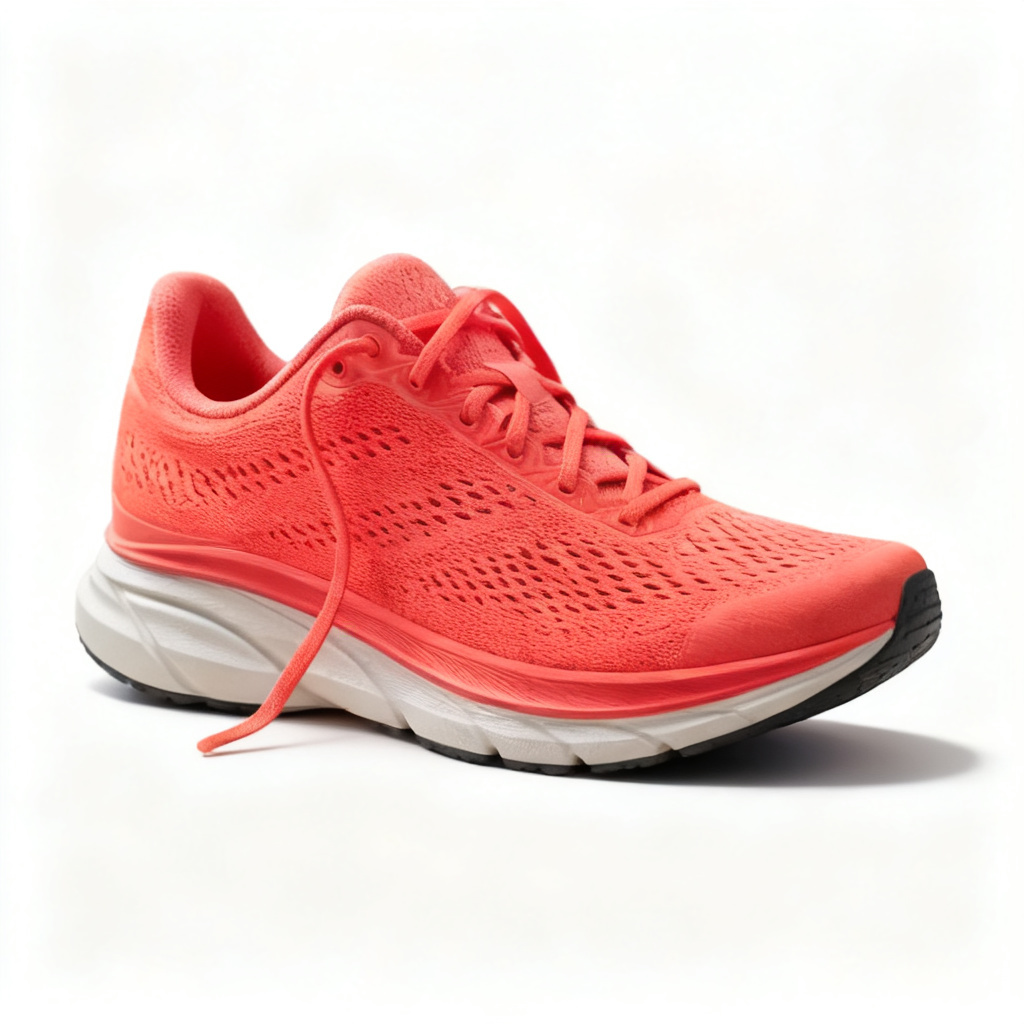
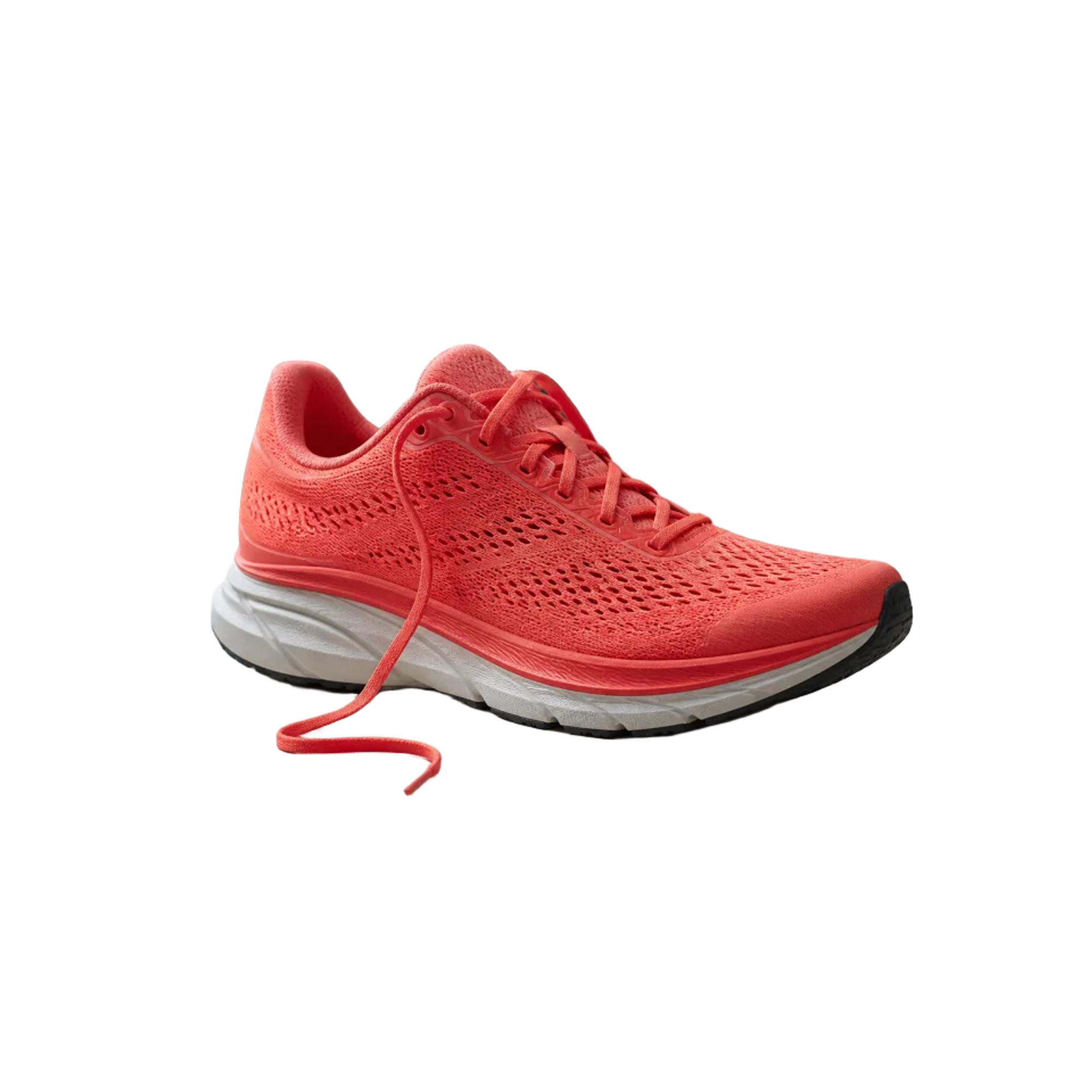
Both routes ran on 28 October 2026 through the production gateway behind this site: one call to Seedream v4 edit for the middle image, and one call to BiRefNet v2 followed by a deterministic resize-and-pad step for the right one. Outputs are unretouched and shown at their delivered aspect; request ids, parameters and per-call cost are recorded in the repository.
Read the unedited prompt
Product photograph for a marketplace listing. Keep the coral running shoe exactly as it is: same silhouette, same laces, same mesh texture and colour. Replace only the background with a plain off-white studio surface, and add a soft contact shadow directly beneath the sole. No text, no props, no second product, no colour cast on the shoe.
- The single call kept the shoe’s geometry, mesh texture and colour, and it delivered the off-white surface and the contact shadow. It did not keep the lace: the loose end that loops on the workbench came back as a straighter strand with a rounded, floating tip and a thin grey stroke underneath it. Nobody asked for that change — that is what “plausible” means in practice.
- It also re-framed the product to fill a square. A square file and a new composition are different requests; only a crop or a deterministic resize is guaranteed to keep the original framing.
- The cut-out preserved the actual pixels of the lace, its loop and its flattened tip, because BiRefNet returns a real alpha channel — the artefact a single instruction cannot reliably hand back.
- The exact-size step made the file 2,000 × 2,000 but did not make it sharper: it resampled a 960-pixel cut-out, so the third image is the right size at interpolated resolution. Size and detail are separate problems, which is why a pipeline is worth it only when the artefact needs one of them.
- Cost followed the structure rather than the quality: either route cost $0.03 in model calls at the prices published when this ran, because the second one needs a single cut-out call and a free deterministic step. What a pipeline buys is the artefact, not extra fidelity.
The loop, step by step
A working loop has five stages, and each has a characteristic failure.
1. Read the request and the inputs
Which images arrived, what they show, what the words ask for. Failure mode: treating “this” as obvious when two images were attached.
2. Plan and price
Choose the steps, choose the tools by capability rather than by brand, and work out the credit price of the result. Failure mode: a plan that quietly escalates scope — a “simple” background swap that adds a reshoot of shadows and a second upscale.
3. Confirm
The plan is shown as numbered steps, with a run action and a change request. This is where a wrong reading gets caught cheaply, before any credits are spent.
4. Execute, step by step
Failure mode: a step that succeeded mathematically and failed visually, such as a cut-out that kept the hair but dropped the wisp.
5. Verify and decide
Compare against the requirements, then accept, retry differently, or hand back what is missing. Failure mode: retrying the same call and calling it a fix.
In this workspace the loop is literal: the image agent workspace prints the plan as numbered steps and waits — run it, or send a change request. Credits are charged per outcome when a run starts, and a run the account cannot cover is stopped with a message before it begins.
Seven checks that separate an agent from a chat box
Use these on any tool that claims the label. None of them requires reading a paper.
- Does it show a plan before it runs, and can you change it? Ask for something with an implied decision, such as a marketplace-ready product image. A tool that returns an image without ever stating size, background and count has already guessed on your behalf.
- Does it say what it assumed? A plan should name the ambiguous parts: shadow retained or replaced, light direction, whether text is re-rendered or preserved.
- Does it ever choose fewer steps? If every request becomes a pipeline, the “agent” is a fixed script with extra words. The correct answer to most edits is one call.
- Does it pick tools by capability? “Upscale to 4096” needs a step that controls exact output size; a product shot that must not change shape needs a step that preserves the untouched pixels. Tools that advertise capabilities instead of brand names can be checked; ones that only list model names cannot.
- Does verification produce a rejectable result? Ask what would make it redo the run. “We check quality” is not an answer; “the label must be legible at 100%” is.
- Does it retry differently? A second attempt should change a variable — scale, model, crop — not repeat the same call in hope.
- Does it refuse, and say why? Editing a document to change what it proves, or “restoring” a plate number, is the case a serious tool declines. A tool that never refuses has no boundary, so its verification is not real either.
Two more signals are cheap to collect: whether you can re-run a single step without paying for the whole pipeline again, and whether the returned file matches the size, format and transparency the plan promised.
What it still gets wrong
Being honest about the weak points is the only way the label keeps meaning something.
- Text stays the first casualty. Small type, unusual fonts and labels inside a scene are re-invented rather than copied. Check character by character at 100%.
- Transparency is inferred, not measured. Glass, smoke and fine hair are where a cut-out looks right at thumbnail size and wrong on a coloured background.
- Upscaling invents. A reconstruction pass adds plausible detail; it cannot recover what the sensor or the render never captured, which the upscaler page states as a 4× ceiling rather than a promise.
- Costs scale with steps. A pipeline is not free competence: it is more calls, more chances to fail, and a higher credit price.
- Video is not covered yet. The same loop applies, but a video run multiplies the verification problem, and it is not live here.
What a multi-step edit actually costs
Pricing is the part buyers can compare, so it belongs in the definition. In this workspace the unit is an outcome class, not a model call: the same result costs the same credits whether it took one call or three.
| Outcome | Credits | What it covers |
|---|---|---|
| Light edit | 10 | Background swap, object removal, recolour, text change, upscale |
| High-quality edit | 30 | Restoration, face repair, tricky relighting on a costlier model |
| Multi-step pipeline | 35 | Cut out, compose and retouch delivered as one result |
| Product photo set | 50 | Cut-out plus four scene composites at marketplace sizes |
Read the table as an argument: a light edit at 10 credits is the default, and the 35-credit pipeline is only worth it when the artefact genuinely needs several steps. The full breakdown sits on the pricing page.
Questions about agentic image editing
- What is agentic image editing? Editing where the tool plans the steps, runs them and checks the result, instead of executing one instruction once. The plan, the tool choice and the verification are the tool’s decisions; the approval before each run is still the user’s.
- Is it better than one strong edit model? Often not. One call keeps global consistency and avoids stitching seams. Multi-step wins only when the artefact needs exact dimensions, transparency, batch consistency or print headroom.
- How do I know if a tool is really agentic? Ask for the plan before it runs, and ask what would make it reject its own output. If both answers are specific, the loop exists; if either is vague, it is an instruction wrapper.
- Does agentic editing cost more? Usually, because steps cost calls. Here a light edit is 10 credits and a multi-step pipeline 35 — the pipeline is worth it only when the single-call route cannot deliver the file.
- What is “verification” in this context? A per-model checklist compared against the requirements: label legibility, edge quality against a coloured background, preserved product geometry, and whether the returned file has the promised size and channels.
- Can it fix a photo that is blurry, not just small? No. Motion blur and missed focus are not resolution problems, and a reconstruction pass sharpens edges around soft content. Different repair paths are covered in the pixelation guide.
If you want to test the loop rather than read about it, describe an edit that contains a real decision — a product shot for a specific marketplace — and read the plan before confirming it. The plan is the honest part of the product: it shows the proposed steps before anything runs, the credit price of the result is published on the pricing page, and the plan can be refused for free.